3-Way Matching in Accounts Payable and How to Automate It
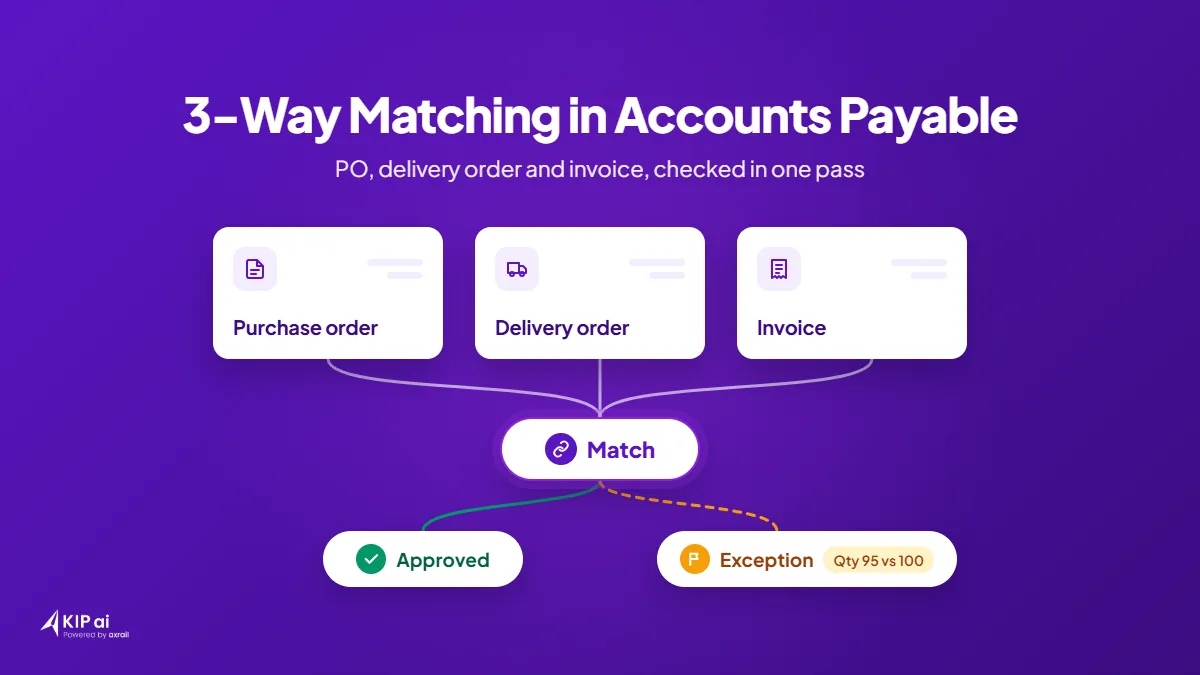
3-way matching is an accounts payable check that compares the purchase order (PO, what you ordered), the delivery order or goods received note (GRN, what arrived) and the supplier invoice (what you are billed) before payment. If quantities, prices and references agree, the invoice moves on to the ERP (your accounting system).
KIP.ai by Axrail automates this check for finance managers and accounts payable (AP) leads who still match POs, delivery orders and invoices by hand. This guide covers how 3-way matching works, how it differs from 2-way matching, and how KIP.ai handles it.
What is 3-way matching in accounts payable?
3-way matching in accounts payable confirms that you pay only for what you ordered and received. The purchase order, the delivery order or goods received note, and the invoice must agree on quantity, price and reference before payment is approved. Every line is compared, not just the invoice total.
Here is a generic example, not a customer case. A PO is raised for 100 units, the delivery order shows 95 units received, and the invoice bills 100 units. A 2-way check would pass this invoice, because the PO and the invoice agree. Three-way matching catches the gap, because the delivery order does not support what the invoice asks you to pay.
Many teams also set a matching tolerance, which is the small difference they accept between the documents before a line counts as a mismatch. Three-way matching works best where goods arrive in separate deliveries and prices can change between the order and the invoice.
What is the difference between 2-way and 3-way matching?
2-way matching compares the purchase order with the invoice. 3-way matching adds the delivery order or goods received note, so the invoice is also checked against what actually arrived. Use 2-way matching where there is no physical delivery to confirm, such as some services, and 3-way matching for goods.
| 2-way matching | 3-way matching | |
|---|---|---|
| Documents compared | Purchase order and invoice | Purchase order, delivery order or GRN, and invoice |
| What it catches | Price or quantity differences between the order and the bill | The same differences, plus invoices for goods that were not delivered or only partly delivered |
| When to use it | Services or items with no delivery record | Goods received in one or more deliveries |
Why does manual 3-way matching slow down month-end close?
Manual 3-way matching slows month-end close because every invoice waits for someone to find the PO and the delivery record, retype the figures and compare them line by line. Mismatches surface late, when the team is already short of time, so exceptions pile up just as the books need to close.
The delays usually come from the same places:
- The three documents live in different places, such as email, shared folders, paper and the ERP.
- Figures are retyped into spreadsheets, so each document is read more than once.
- A missing delivery record stops an invoice until someone chases it.
- Every invoice gets the same line-by-line check, whether it matches or not, so the real exceptions are found last.
How do you automate 3-way matching?
To automate 3-way matching, capture the purchase order, delivery order and invoice, extract their fields into structured data, match them automatically, and route only mismatches to a person. Approved matches then post to the ERP. The aim is to automate 3-way matching so your team reviews exceptions instead of checking every line.
- Capture. Bring the PO, the delivery order or GRN and the invoice into one place.
- Extract. Read the key fields from each document, such as supplier, reference, quantity, price and amount.
- Match. Compare the three documents line by line, using your matching tolerance.
- Flag exceptions. Mark anything that fails, with a reason such as a quantity mismatch, a price variance or a missing reference.
- Review and approve. A person reviews the flagged items, and a second person approves.
- Post to the ERP. Send approved, clean data to the accounting system.
What happens to invoices that don’t match?
An invoice that does not match goes to an exception queue instead of being paid. A person reviews the reason, such as a quantity mismatch, price variance or missing reference, then decides whether to approve, query the supplier or hold payment. Every exception is flagged for your team to review and decide.
In the generic example above, the invoice bills 100 units but the delivery order shows 95. The mismatch is flagged with its reason, a quantity mismatch. The decision stays with your team: query the supplier, wait for the rest of the delivery, or approve the invoice with a note.
How does KIP.ai handle 3-way matching?
KIP.ai cross-checks the purchase order, delivery order and invoice in one pass, before data reaches the ERP. Exceptions are flagged with a reason: quantity mismatch, price variance or missing reference. Low-confidence fields are highlighted for review, so your team spends its time on the items that need a decision.
In KIP.ai, a maker reviews and a checker approves. Approved items go to the invoice listing, and exceptions go to an exception queue. KIP.ai sends clean data to ERPs such as Xero, QuickBooks and Oracle NetSuite.
According to KIP.ai’s product site, teams spend 80% less time per document (15 to 3 minutes), with 90% extraction accuracy on supported documents.
You can see the AP 3-way matching workflow in the live demo on gokip.ai. The demo has built-in sample documents, and no files or account are needed. When you are ready to try KIP.ai on your own documents, start a free trial or book a demo.
Axrail is an AWS Premier Partner.
Frequently asked questions
What are the three documents in 3-way matching?
The three documents are the purchase order (PO), the delivery order or goods received note (GRN), and the supplier invoice. The PO shows what you ordered, the delivery record shows what arrived, and the invoice shows what you are billed. Payment is approved only when all three agree on quantity, price and reference.
Can 3-way matching be automated?
Yes. Software can capture the three documents, extract their fields, compare them line by line and flag mismatches with a reason. A person then reviews the exceptions and approves the rest before posting to the ERP. KIP.ai automates this flow and highlights low-confidence fields so your team reviews what needs a decision.
What is a matching tolerance?
A matching tolerance is the small difference you accept between the documents before a line counts as a mismatch. For example, you might accept a minor price difference but not a quantity difference. Setting it keeps trivial gaps from creating exceptions while real discrepancies still reach your team for review.
Does KIP.ai replace the review step?
No. Every exception is flagged for your team to review and decide. In KIP.ai, a maker reviews flagged items and low-confidence fields, and a checker approves. Approved items go to the invoice listing and exceptions go to an exception queue, so people stay in control of what is paid.
Can I try KIP.ai's 3-way matching without uploading files?
Yes. The live demo on gokip.ai has an AP 3-way matching workflow with built-in sample documents, so you do not need to upload files or create an account. You can see how KIP.ai cross-checks the purchase order, delivery order and invoice before you start a free trial or book a demo.