Accounts Receivable Automation: What It Is and How to Start
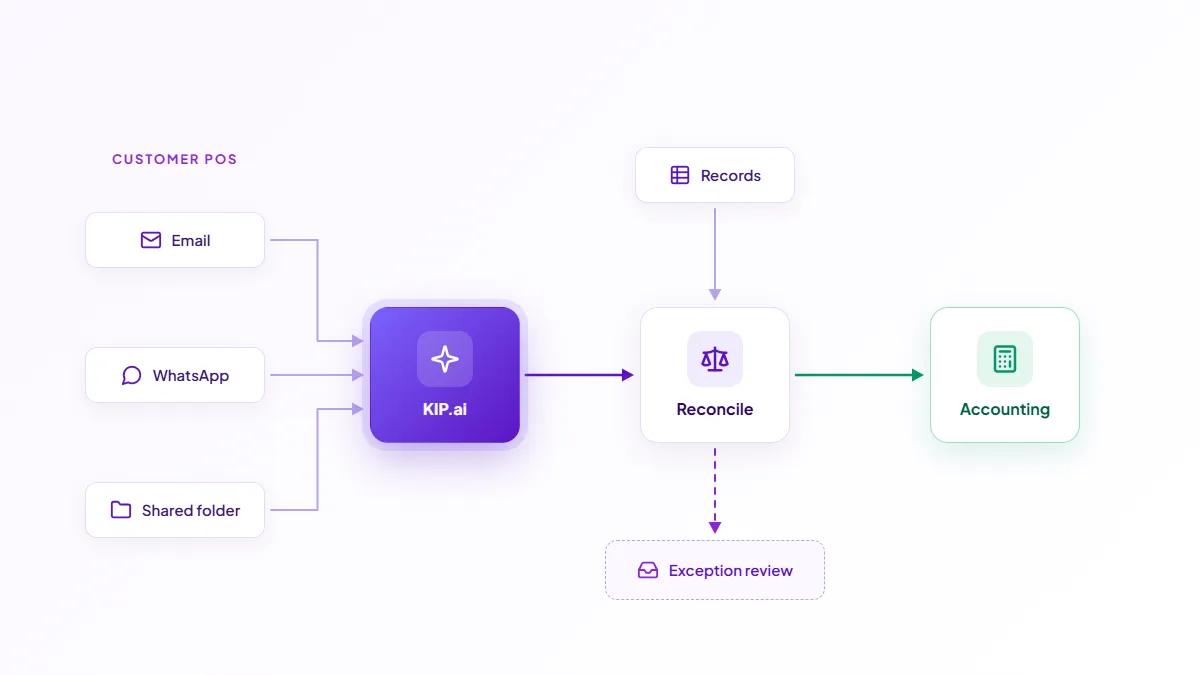
Accounts receivable automation is software that runs the inbound side of finance with far less manual data entry. It captures incoming customer documents such as purchase orders, extracts the fields, reconciles them against your records, routes anything unusual for review and sends clean data to your accounting system. People still decide how exceptions are resolved.
KIP.ai by Axrail automates this for finance teams who still key customer orders that arrive by email, WhatsApp or a shared folder. Axrail, an Applied AI expert and AWS Premier Tier Partner, built KIP.ai to read those documents and feed one clean workflow while keeping a person in control of every exception. This guide covers what accounts receivable automation is, how it works and how KIP.ai fits with your accounting system.
What is accounts receivable automation?
Accounts receivable automation replaces the manual reading, keying and chasing on the inbound side of finance with a software workflow. Instead of a person opening each customer purchase order, typing its details into the system and checking it by hand, the software captures the document, reads it into structured fields and reconciles it against your records. The result is faster processing and fewer keying errors.
Pelangi Publishing Group uses KIP.ai on exactly this side of finance, automating customer purchase orders that arrive by email, WhatsApp and fax. You can read the full story in how Pelangi Publishing Group automated customer orders.
The old way vs the new way
In the manual process, a team member receives a customer order, reads it, types the details into the system, checks them against the customer and pricing records, and follows up when something looks off. That is roughly 15 minutes per document, and every hand-off risks a typo or a missed order.
With automation, the same document is captured once, read into structured fields, reconciled automatically and routed only when something does not agree. KIP.ai targets about 80% less time per document, with 90% extraction accuracy on supported documents.
| Step | Manual AR | Automated AR with KIP.ai |
|---|---|---|
| Capture | Open email, WhatsApp or file | Document ingested automatically |
| Data entry | Type details into the system | Fields extracted automatically |
| Reconcile | Check against records by eye | Reconciled against your records |
| Exceptions | Spotted late | Flagged with a reason for review |
| Posting | Re-key into the system | Clean data sent to the accounting system |
How do you automate accounts receivable?
Start with the documents that arrive in the highest volume, which for many teams is customer purchase orders. The flow has four stages. Capture brings the document in from email, WhatsApp, a shared folder or SFTP. Extraction turns it into structured fields. Reconciliation checks those fields against your customer and pricing records. Routing sends clean documents onward and sends anything unusual to a review queue, with low-confidence fields highlighted so a person checks exactly what needs a decision.
How is this different from an aging report?
Accounts receivable automation is the process of capturing and handling inbound documents and payments. An aging report is a view of unpaid invoices grouped by how overdue they are. They work together: automation feeds cleaner, timelier data into the ledger, which makes a report like the aging report more reliable. See the accounts receivable aging report for how to read and automate that report.
Governance and control
Automation does not mean losing oversight. Every exception is flagged for your team to review and decide. KIP.ai uses a maker-checker pattern: a maker reviews flagged items and low-confidence fields, and a checker approves. Approved documents move on and exceptions wait in a queue, so people stay in control.
How KIP.ai fits your accounting system
KIP.ai sends clean, reconciled data to your accounting system and works with Xero, QuickBooks and Oracle NetSuite, among other systems. You keep your ledger and controls while removing the manual capture and reconciliation in front of them.
See it in action
The live demo runs a document workflow with built-in sample documents, so you can see capture, extraction and exception handling. When you are ready, start a free trial or book a demo with the Axrail team.Frequently asked questions
What is accounts receivable automation?
Accounts receivable automation is software that handles the inbound side of finance with less manual data entry. It captures incoming customer documents such as purchase orders, extracts their fields, reconciles them against your records and sends clean data to your accounting system. People still review exceptions and decide.
How do you automate accounts receivable?
Start with the documents that arrive in volume, such as customer purchase orders by email, WhatsApp or a shared folder. The software reads each one into structured fields, checks them against your records and routes anything unusual for review. KIP.ai does this and flags every exception for your team to review and decide.
What is the difference between AR automation and an aging report?
AR automation is the process of capturing and processing inbound documents and payments. An aging report is a view of unpaid invoices grouped by how overdue they are. Automation feeds cleaner data into the ledger, which makes reports such as the aging report more reliable.
Does accounts receivable automation remove human review?
No. Every exception is flagged for your team to review and decide. A maker reviews flagged items and low-confidence fields and a checker approves. Automation removes the keying and chasing, so your team spends time on the customer relationships and the genuine exceptions.
Can I try KIP.ai on the AR side with sample documents?
Yes. The live demo on gokip.ai runs a document workflow on built-in sample documents, with no files or account of your own needed, so you can see capture, extraction and exception handling before you start a free trial or book a demo.