The Procure to Pay Process: Steps, Gaps and Automation
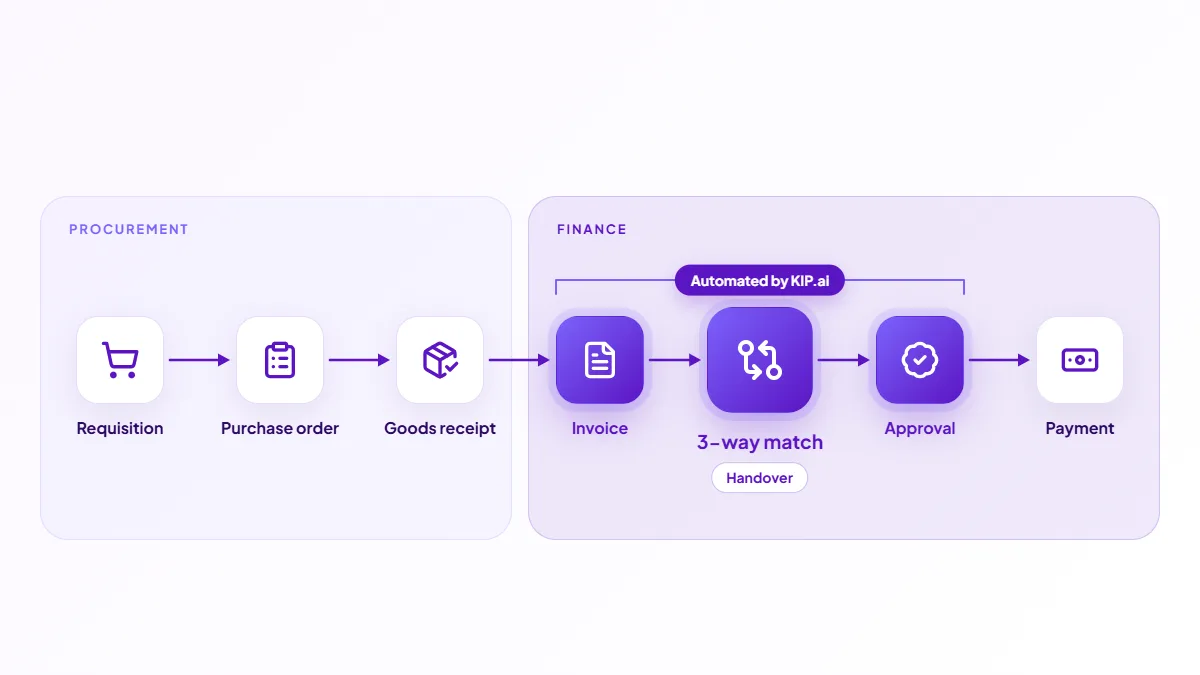
The procure to pay process, often shortened to P2P, is the end-to-end chain from requesting goods or services to paying the supplier. It typically runs through requisition, purchase order, goods receipt, invoice, 3-way match, approval and payment, connecting procurement and finance into one flow.
KIP.ai by Axrail automates the invoice stages of this chain, which is where most of the manual work sits. Axrail, an Applied AI expert and AWS Premier Tier Partner, built KIP.ai to capture, match and route invoices before they reach your ERP. This guide covers the steps, where the process breaks down and how automation helps the back half.
What is the procure to pay process?
Procure to pay is the full lifecycle of a purchase, from the moment someone requests something to the moment the supplier is paid. It spans two teams. Procurement handles the early steps of requesting and ordering. Finance handles the later steps of matching, approving and paying. The 3-way match sits at the handover between them.
What are the steps?
| Step | What happens | Owner |
|---|---|---|
| Requisition | Someone requests goods or services | Requester |
| Purchase order | The order is approved and sent | Procurement |
| Goods receipt | What arrives is recorded | Receiving |
| Invoice | The supplier bills you | Supplier |
| 3-way match | Invoice checked vs PO and receipt | Accounts payable |
| Approval | The invoice is signed off | Approver |
| Payment | The supplier is paid | Accounts payable |
Where does procure to pay break down?
Most delays cluster in the invoice stages: capturing invoices, matching them to the PO and receipt, and chasing approvals. These steps are manual and high volume, so they create backlogs, late payments and keying errors. The procurement steps are usually better structured because they start from a system-generated PO, while invoices arrive in every format from every supplier.
How does automation help the back half?
Automating capture and matching removes most of the friction after the invoice arrives. KIP.ai captures each invoice, extracts its fields, runs the 3-way match against the PO and receipt, and routes approvals. Clean invoices flow through and exceptions are flagged, so your team spends time on decisions rather than data entry. KIP.ai targets about 80% less time per document. See 3-way matching for the detail.
How is procure to pay different from accounts payable?
Accounts payable is the back half of procure to pay: invoice receipt, matching, approval and payment. Procure to pay is the whole chain, including the procurement steps that come first. Automating AP improves the part of P2P where most of the manual effort lives, which is why it is usually the first place teams focus. See accounts payable automation for that scope.
See it in action
The live demo runs an AP workflow with built-in sample documents, so you can see how the invoice stages of procure to pay are automated. When you are ready, start a free trial or book a demo with the Axrail team.Frequently asked questions
What is the procure to pay process?
Procure to pay, or P2P, is the end-to-end process from requesting goods or services to paying the supplier. It typically runs through requisition, purchase order, receipt of goods, invoice, matching, approval and payment. It connects procurement and finance into one chain.
What are the steps in procure to pay?
The common steps are requisition, purchase order, goods receipt, invoice receipt, 3-way match, approval and payment. The first steps are usually owned by procurement and the later ones by accounts payable, with matching sitting at the handover between them.
Where does procure to pay usually break down?
Most delays happen at the invoice stages: capturing invoices, matching them to the PO and receipt, and chasing approvals. These are manual and high volume, so they create backlogs and errors. Automating capture and matching removes much of the friction in the back half of the process.
How does KIP.ai fit into procure to pay?
KIP.ai automates the invoice stages: it captures invoices, extracts their fields, runs the 3-way match against the PO and receipt, and routes approvals. Every exception is flagged for your team to review and decide, and approved data flows to your ERP for payment.
What is the difference between procure to pay and accounts payable?
Accounts payable is the back half of procure to pay, covering invoice receipt, matching, approval and payment. Procure to pay is the whole chain, including the procurement steps of requisition, purchase order and goods receipt that come before the invoice.